Introduction
Version 1.0This Travel Portal API documentation provides a blueprint of the service endpoints and mechanism for implementing them. API provides RESTfull services, which have been built to handle most complex Airline Searching,Pricing and Booking scenarios with optimum performance. We urge clients to access these APIs as per the guidelines listed in this document to realize the full potential of these APIs. The search to booking functionality is provided as a set of services to the clients for consumption using which the end users can make bookings. Travel Portal API provides secure and accurate searching for Flights based on variety of parameters and allows clients to request for ancillary services .For optimal performance, we encourage clients to provide as many details as possible within each service request.
About REST API
REST stands for Representational State Transfer. REST is an architectural style for designing networked applications. It is an alternative to using complex mechanisms like COBRA, RPC, and SOAP to connect between client and server. REST makes communication between remote computers easy by using the simple HTTP protocol which support for CRUD (Create, Read, Update, and Delete) operations on the server. In a way, our World Wide Web is also based on the REST architecture. In a nutshell, REST is based on the representation of resources. A resource is an object that we can access over the World Wide Web. It can be a document, an image, or anything. When we request a resource (an object) from a server, the server returns the representation of that resource. In REST architecture, a client requests an operation (CRUD) on an object (resource) on the server, and the server returns data as per requirements. Example – Let us consider a Web Service that returns Employee information. The Web Service responds to client calls by polling a database and returning a result. In classical Web Services or WCF Services, we would have a method exposed to clients, like GetEmployee(). The REST architecture is different from this as it does not work with the methods but with nouns (resources / objects) and allow verbs (HTTP Methods) to operate on them. So if we want to get Employee information, we send an HTTP GET on the object Employee rather than query a method like GetEmployee(). The advantage is manifold, the most important being the power and flexibility that we get in our hands to play around with the object.
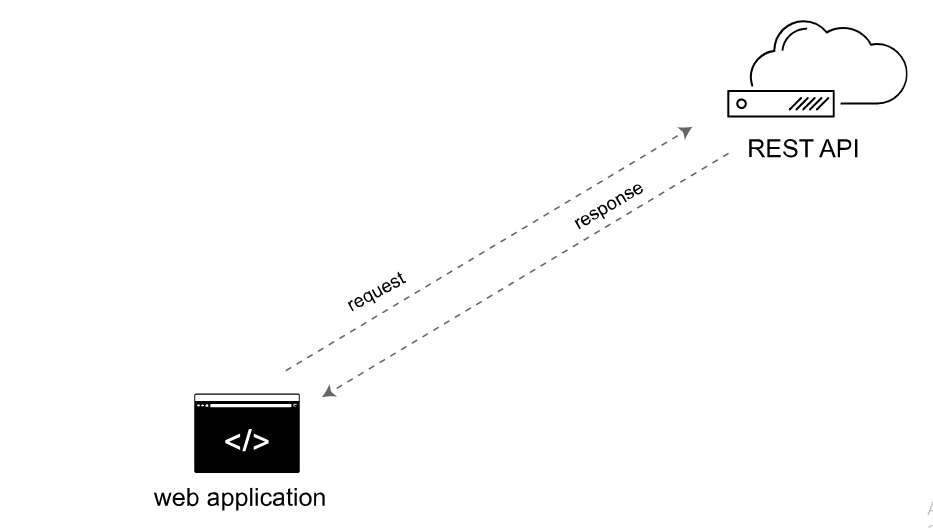
Why use REST
Let us consider a practical example. Imagine that you have to build a Web Service which should be cross functional and should be able to be consumed by any client. Traditional Web Services in .NET have to be consumed using a proxy. What if the client does not know how to create a proxy? Imagine that your Web Service needs to be consumed by a client running on an iPhone or Android. As far as I know, Objective C does not know how to create a proxy. It only knows to send basic HTTP verbs – GET, PUT, POST, and DELETE – to the server and expect XML or string as response. Enter the world of REST!!
HTTP verbs
At this time, it is worthwhile to revise our basic HTTP verbs. give a brief introduction. Detailed information is easily available over the internet.
- GET
- POST
- PUT
- DELETE
GET is one of the simplest HTTP methods. Its main job is to ask the server for a resource. That resource may be an HTML page, a sound file, a picture file (JPEG) etc. We can say that GET method is for getting something from the server. In GET method, the data we send is appended to the URL.
The POST method is used to submit data to be processed (e.g., from an HTML form) to the identified resource. The data is included in the body of the request. This may result in the creation of a new resource, or the updates of existing resources, or both.
The PUT method is used to submit data to be updated (e.g., from an HTML form) to the identified resource. Like the POST method, the data is included in the body of the request.
The DELETE method is used to delete a specific resource
Process Flow
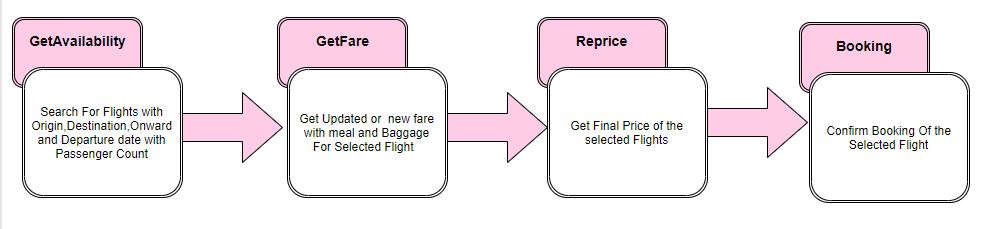
Typical Search to Booking Workflow is Described Below
Details Of Operation
In order to invoke the services, all API Clients need to be whitelisted in our system. We will initiate the Client access during client registration. The exchange of information between API Client and System happens through HTTP POST method for the requested operation. Each operation is called by posting the appropriate request XML data for the corresponding operation. The System should return the desired response XML data pertaining to the particular operation. HTTP content type “application/xml” would be used for request and response. Travel Portal API will provide Token in response the first request of a session, i.e. search request. The same Token should be passed in each subsequent request related to the same transaction.
API AccessIn order to access our services, the client needs to register with us. Once registered, the client authentication credentials will be shared along with our Service endpoints and URLs. This API support input and output in JSON and XML format. Sample Request format :
- http://ServerIP/Api/webapi/GetAvailability?type=json
- http://ServerIP/Api/webapi/GetAvailability?type=xml
If client need data in JSON format then type=json and same way if it is XML then type=xml By default API return results in JSON format
- Search
- Pricing
- RePricing
- Seat Availability
- Booking
The basic functions being performed by our system are:
Search Request
Purpose of this operation is to allow clients to search for Flights according to their search criteria. This operation will return all available Flights for the specific search criteria provided by the client.
A basic Flight search is composed of the following mandatory search criteria:
- Source and Destination
- Date Information –Travel Date (Onward and Return Date)
- Number of Passengers (Count of Adults and Children)
- Travel Type
- Trip Mode
In case of onward journy set onward date and return date are same
| Parameter Name | Description | Optional / Mandatory | Valid Values |
|---|---|---|---|
| UserID | UserID of the client,this will be provided at the time of registration | M | Alpha Numeric |
| Password | Password of the client,this will be provided upon client registration | M | Alpha Numeric |
| Origin | Source to Travel | M | 3 letter Airport code |
| Destination | Destination to Travel | M | 3 letter Airport code |
| Onward Date | Travel Date | M | Date format will be YYYY-MM-dd, 2018-06-25 |
| ReturnDate | Return Travel Date | M | Date format will be YYYY-MM-dd, 2018-06-25 |
| Adult | Number of Adult Passenger | M | Numeric |
| Child | Number of Child Passenger | M | Numeric |
| Infant | Number of Infant | M | Numeric |
| Trip Mode | Onward or Return Journey | M | use O for Onward and R for Round Trip |
| Travel Type | Domestic or International | M | Use D for Domestic and I for International use capital letters |
| Origin Nation | Nation of Travel begins | M | Use 2 character ISO Country Code |
| Destination Nation | Nation of Travel Destination | M | Use 2 character ISO Country Code |
| Include Airline | O | ||
| Exclude Airline | O | ||
| Economy | specify Airline classes like Economy,Business etc.. | M | alphabet |
Search Request in XML
Url :http://ServerIP/Api/webapi/GetAvailability?type=xml
Method :POST
Search Request in JSON
Url :http://ServerIP/Api/webapi/GetAvailability?type=josn
Method :POST
Search Response
Search response shows basic details about the available airlines from source to destination. The Token is used for all further requests . Important fact is token valid only for a particular duration of time. Basic details of the Airline is described under flight option Node.Flight Options contains multiple Flight Option.each Flightoption include the details of fare and segment.Segment wise free baggage specified in flightLeg node.Fare details are given under FlightFare node,some airlines have multiple fares for same segment which have identified using fare name and FID,free baggage for each fare is specified in Flight Leg node if the fare having free baggage.Some boolean values are used to identify particular services like Seat,Reprice,FrequentFlayerNumber etc.
if SeatEnabled =true, the airline provide seat selection service .In such case separate request is used to to get seat details
if reprice =true specifies need a reprice before booking.
if FFNoEnabled =true,the airline support frequent flyer number
by default the values are set to be false ,values may be changed in fare responsee.so consider the values in fare response
Search Response in XML
Search Response in JSON
Fare Rule
Fare Rule request is used to get fare related rules and conditions of the Airlines.Use first part of flight option key as ItineraryId,ie if flight option key is 400013|%$|0|%$|7|%$|7 ,use 400013 as ItineraryId
Fare Rule Request in XML
Url :http://ServerIP/Api/webapi/GetFareRule?type=xml
Method :POST
Fare Rule Request in JSON
Url :http://ServerIP/Api/webapi/GetFareRule?type=json
Method :POST
{
  "Token": "HRLlWmLi1kiwS0Qdn1cxSrszRQVSu9",
  "UserId": "Userid",
  "ItineraryId": "142200028"

}
Fare Rule Response in XML
Fare Rule Response in JSON
Fare Request
It is used to check whether any change for selected airline fare and getting optional services like meals and baggage . select one flight option from search response , use all nodes of the selected flight option for the Fare Request
For round trip set TripMode as "S" and "O" for onward
| Parameter Name | Description | Optional / Mandatory | Valid Values |
|---|---|---|---|
| UserID | UserID of the client,this will be provided at the time of registration | M | Alpha Numeric |
| Token | Token generated in Search response | M | Alpha Numeric |
| TripMode | Onward or Return Journey | M | use O for Onward and R for Round Trip |
| Flight Option | Selected flight details | M | Xml /Json |
Fare Request in XML
Url :http://ServerIP/Api/webapi/GetFare?type=xml
Method :POST
Fare Request in JSON
Url :http://ServerIP/Api/webapi/GetFare?type=json
Method :POST
Fare Response
The response contains details of the Updated fare with Optional Services like baggage and meal.
Optional services are specified under SSR Availability node.
Passenger Info node provide the PaxKey and PaxNo for Identifying the passenger, must pass this values for reprice ,seat and booking request.segment wise meals and baggages are identified using mealKey and Baggage key specified in Flight Leg.
Meal and Baggage for each passenger is identified using PaxKey specified in Meal and Baggage Node.
boolean nodes give final values,it may be different from search response.In most cases Seat Enabled and Rerprice value are changed to true.
TotalAmount,discount,tax,basic fare are given in fare response
(Total Amount = basic + tax)
if Reprice is true must pass a reprice request.
all other airlines are need reprice when any of the optional services like meal,baggage or seat are selected.
Some mandatory fileds are specified in passengerinfo,must give the details when it is true
Some response give Host Token Node,must pass this node for further request
sample Host Token
Fare Response in XML
Fare Response in JSON
Seat Request
Seat Request is used as an optional service.if an Airline provide seat selection service ,is specified in Flight Option with status of Seat Enable attribute is true. Use Paxkey and PaxNo from fare response for creating seat request
Seat Request in Xml
Url :http://ServerIP/Api/webapi/GetSeatAvailability?type=xml
Method :POST
Seat Request in JSON
Url :http://ServerIP/Api/webapi/GetSeatAvailability?type=json
Method :POST
Seat Response
Seat Response provide details of the seats in segment wise. select any of the seat from the result where value of BlockAttrib node is equal to null or empty , other wise block attrib shows "disabled" status such seats are not available for booking. Use Seat key of the selected seats for reprice and booking request
Seat Response in XML
Seat Response in JSON
Reprice Request
Reprice Request is used on the following cases
1.Flight option specifies reprice =true 2.Flight option specifies reprice =false,and any of the optional services like baggages,meal or seat are selected Reprice Request is used to get the final fare of selected flights. must pass all nodes/ values of the fare response with addition of passenger information . Select Meal and Baggages for the passenger from the fare response result. Segment wise meal and baggage can be identified using MealKey and BaggageKey from FlightLeg node. Meal , baggage and Seat for each passenger is specified under passenger details node with corresponding leg key.seat details are taken from seat response if Seat Enabled is true and the user not use seat availability service then set SeatEnabled =false if Seat Enabled is true must pass seat details in SeatInfo node under SSR AvailabilityNode of each passenger
|
Parameter Name |
Description |
O/M |
Valid Values |
|---|---|---|---|
|
Title |
Addressing a passenger |
M |
Mr or Mrs |
|
First Name |
First Name of passenger |
M |
alphabets |
|
Last Name |
Last Name of passenger |
M |
alphabets required minimum 2 characters |
|
DOB |
date of birth of passenger |
M |
Date format will be YYYY-MM-dd, “2018-06-25” |
|
Contact |
contact number of passenger |
M |
Numeric |
|
CountryCode |
ISO country code for phone |
M |
Numeric |
|
|
email address of passenger |
M |
xyz@gmail.com |
|
Nationality |
Nationality of the passenger |
M |
Use 2 character ISO Country Code |
|
County Of Issue |
Country of passport issue |
M |
Use 2 character ISO Country Code |
|
Date Of Expiry |
Expiry date of passport |
O |
alpha Numeric |
|
Address |
address of the passenger |
M |
string value |
|
Pincode |
zip code |
M |
673014 |
|
Pax Type |
Passenger type |
M |
ADT for adult, CHD for child,INF for infant |
|
MealInfo/Meal/PTC |
Passenger type |
M |
ADT for adult, CHD for child,INF for infant |
|
MealInfo/Meal/Code |
Meal code of the selected meal given by fare response |
M |
Alpha Numeric |
|
MealInfo/Meal/Name |
Meal Name of the selected meal given by fare response |
M |
String Value |
|
MealInfo/Meal/Amount |
Meal Amount of the selected meal given by fare response |
M |
integer value |
|
MealInfo/Meal/Currency |
currency of the country |
M |
INR |
|
BaggageInfo/Baggage/PTC |
Passenger type |
M |
ADT for adult,CHD for child,INF for infant |
|
BaggageInfo/Baggage/Code |
Baggage code of the selected Baggage given by fare response |
M |
Alpha Numeric |
|
BaggageInfo/Baggage/Name |
Baggage Name of the selected Baggage given by fare response |
M |
String Value |
|
BaggageInfo/Baggage/Amount |
Baggage Amount of the selected Baggage given by fare response |
M |
integer value |
|
BaggageInfo/Baggage/Weight |
Baggage weight |
M |
integer value |
|
BaggageInfo/Baggage/Currency |
currency of the country |
M |
INR |
|
SeatlInfo/Seat/PTC |
Passenger type |
M |
ADT for adult, CHD for child,INF for infant |
|
SeatlInfo/Seat/SeatKey |
Seat Key of the selected Seat given by Seat response |
M |
Alpha Numeric |
|
SeatlInfo/Seat/legKey |
Key of the segment for which Seat is selected |
M |
String Value |
|
SeatlInfo/Seat/Fare |
SeatAmount of the selected Seat given by Seat response |
M |
integer value |
|
SeatlInfo/Seat/Currency |
currency of the country |
M |
INR |
Reprice Request in Xml
Url :http://ServerIP/Api/webapi/Reprice?type=xml
Method :POST
Reprice Request in JSON
Url :http://ServerIP/Api/webapi/Reprice?type=JSON
Method :POST
Reprice Response
Reprice response gives the updated and final fares
Reprice Response in XML
Reprice Response in JSON
Booking Request
To book a ticket Pass fare response / reprice response with selected meal , baggage and seat details.
Booking Request in XML
Url :http://ServerIP/Api/webapi/Booking?type=xml
Method :POST
Booking Request in JSON
Url :http://ServerIP/Api/webapi/Booking?type=json
Method :POST
Booking Response
Based on the information collected from booking request Ticket number and PNR are given for Successful booking.Ticket numbers are provided under passenger details node.in case of any error occured in booking process corresponding errors are given under error node
Booking Response in XML
Booking Response in JSON
Service End Points
UAT Environment
Our UAT server is available at http://ServerIP/Api/webapi
The Service endpoints are as follows 1.Search : /GetAvailability 2.Fare : /GetFare 3.Reprice : /Reprice 4.Booking : / Booking 5.FareRule :/GetFareRule 6.SeatRequest :/GetSeatAvailability Live Environment This Information will be provided after certification process is completed.Certification Process
Once Client completes their development, they need to get the integration certified by us. In order to do client needs to inform us in advance to plan a certification slot. Our certification process involves the following steps of certification XML certification Client needs to execute our pre-defined certification test scenarios in their system and share the log files with the service requests and responses along with the test execution summary. When the client integration is certified, further go-live checklist will be shared with them Following are the typical test scenarios which need to be tested as part of the certification process. The detailed certification test cases will be shared with the client once they place a request for certification.
|
SL.No |
Test Case |
Segment |
Airline |
Specific Test Criterion |
Expected Results |
|---|---|---|---|---|---|
|
1 |
one way domestic |
COK- DEL |
Indigo & SpiceJet |
2 Adult,2 Child,1 Infant |
Successful booking with PNR |
|
2 |
one way domestic |
CCJ- BOM |
Air India |
1 Adult,1 Child,1 Infant |
Failed or success booking logs |
|
3 |
one way domestic with connecction |
CCJ- DEL |
|
1 Adult,1 Child,1 Infant |
Successful booking with PNR |
|
4 |
one way domestic with connecction |
CCJ- DEL |
|
1 Adult |
Successful booking with PNR |
|
5 |
one way domestic with Meal ,Baggage (if SSR Required) |
BLR- DEL |
|
2 Adult,1 Child,1 Infant |
Successful booking with meal and baggage |
|
6 |
one way domestic with Meal ,Baggage |
BOM- DEL |
AirAsia |
2 Adult,2 Child,1 Infant with Mandatory SSR |
Successful booking with meal and baggage |
|
7 |
one way International |
BOM-DXB |
|
1 Adult |
Successful booking with PNR |
|
8 |
one way International |
BOM-DXB |
|
2 Adult,2 Child |
Successful booking with PNR |
|
9 |
one way International |
BOM-DXB |
|
2 Adult,2 Child,1 Infant |
Successful booking with PNR |
|
10 |
one way International with Meal,Baggage (if SSR Required) |
COK-SHJ |
Air Arabia |
2 Adult,2 Child,1 Infant |
Successful booking with meal and baggage |
|
11 |
one way International without meal ,baggage |
COK-SHJ |
Air Arabia |
1 Adult,1 Child,1 Infant |
Successful booking with PNR |
|
12 |
one way International with Meal,Baggage for connection segment (if SSR Required) |
CNN-MCT |
Go Air |
2 Adult,2 Child,1 Infant |
Successful booking with segment wise meal and baggage |
|
13 |
Round Trip domestic |
MAA- HYD |
|
2 Adult,2 Child,1 Infant |
Successful booking with PNR |
|
14 |
Round Trip domestic with Meal ,Baggage (if SSR Required) |
COK- HYD |
|
2 Adult,1 Child,1 Infant |
Successful booking with meal and baggage |
|
15 |
Round Trip domestic with Meal ,Baggage |
BOM- DEL |
AirAsia |
2 Adult,1 Child,1 Infant with Mandatory SSR |
Successful booking with meal and baggage |
|
16 |
Round Trip International |
BOM-DXB |
Indigo |
1 Adult |
Successful booking with PNR |
|
17 |
Round Trip International |
BOM-DXB |
Indigo |
2 Adult,2 Child,1 Infant |
Successful booking with PNR |
|
18 |
Round Trip International |
BOM-DXB |
Indigo |
2 Adult,1 Infant |
Successful booking with PNR |
|
19 |
Round Trip International |
TRV-DMM |
Emirates |
1Adult,2 Child,1 Infant |
Failed or success booking logs |
|
20 |
Round Trip International |
COK-SYN |
Scoot |
1Adult,2 Child,1 Infant |
Successful booking with PNR |
|
21 |
Round Trip International with Meal,Baggage (if SSR Required) |
COK-SHJ |
|
2 Adult,2 Child,1 Infant |
Successful booking with meal and baggage |
|
22 |
Round Trip International with Meal,Baggage for connection segment |
COK-LGK |
AirAsia |
1 Adult,1 Child,1 Infant with Mandatory SSR |
Successful booking with segment wise meal and baggage |
|
23 |
Oneway Connection with seat selection (Domestic) if seat required |
TIR-HYD |
|
2 Adult,2 Child,1 Infant,segemnt wise seat selection with different seat type |
Successfull booking with segment wise seat selection |
|
24 |
Round Trip Connection with seat selection(International) if seat required |
HYD-SHJ |
Indigo |
2 Adult,2 Child,1 Infant,segemnt wise seat selection with different seat type |
Successfull booking with segment wise seat selection |
Client UI Validation
|
Sl.No |
Description |
|---|---|
|
1 |
Origin Should be 3 letter Airport code |
|
2 |
Destination Should be 3 letter Airport code |
|
3 |
Onward Date Should not be in the past |
|
4 |
Return date Should be same or greater than onward date |
|
5 |
Adult Passenger Should be greater than zero |
|
6 |
Child ages should be 2-11 |
|
7 |
Infant ages should be 0-2 |
|
8 |
Must select Title of the passenger |
|
9 |
Passenger First Name Should be alphabets only |
|
10 |
Passenger Last Name Should be two characters |
|
11 |
Client Should Maintain Token getting from search response to last Booking request |
|
12 |
DOB is mandatory for all seat request |
|
13 |
Passenger phone ISO country code validations |
Error Codes
API provides business error messages for all errors in the message response Following is a sample error response received from API
JSON
Contact Us
apisupport@alhind.com